Ross Brancati's Website
3. Click on the MsgAI app
MsgAI Support Page
MSGAI SUPPORT
Last updated: March 8, 2026
MsgAI allows you to interact with AI directly in the Messages app. It adds a layer of conveince for using AI when you are messaging a friend, colleague, or family member.
HOW TO USE:
1. Download the iOS app from the App Store
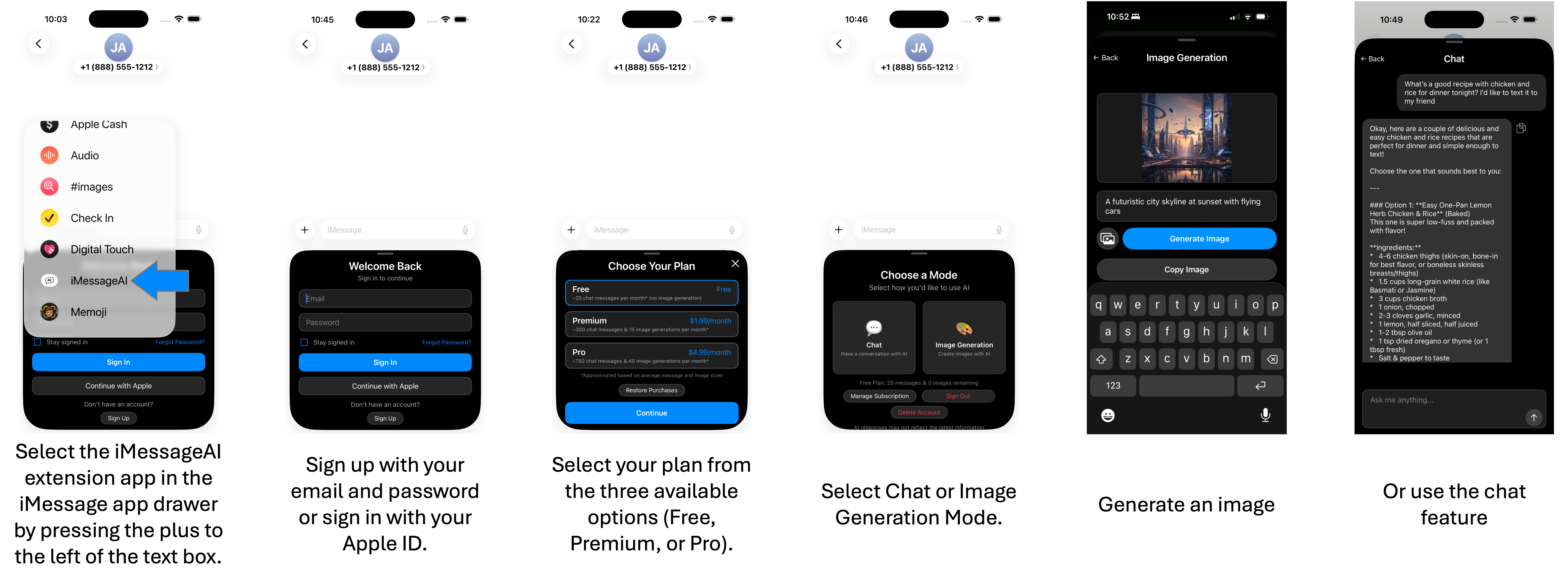
2. Open the Messages app and click the plus sign to the left of the text box to open the Messages app drawer
3. Click on the MsgAI app
4. Sign up or sign in and select a plan (Free, Premium, or Pro)
5. Select the chat or image generation feature. Send your prompt and wait for a response
6. Share the response directly in Messages.
Here is a tutorial on how to use the app: